Thursday, June 12, 2008

Server Runtime Problems in Eclipse Ganymede RC2

This post is one of a number of reviews of the upcoming Eclipse Ganymede release. It has been added to the Ganymede Around the World map. Donate and become a Friend of Eclipse!

After such a good start with Ganymede RC2, today was a bad day getting stuff done. I have tried to run various server runtimes, and I am not at all pleased at the current state of affairs with the web tools. Let's start where I left of in my previous post: I was to install Geronimo and see if things on the web tools front were improved. Geronimo comes with lots of cool Apache stuff such as ActiveMQ, so I want to develop using that app server in Eclipse.
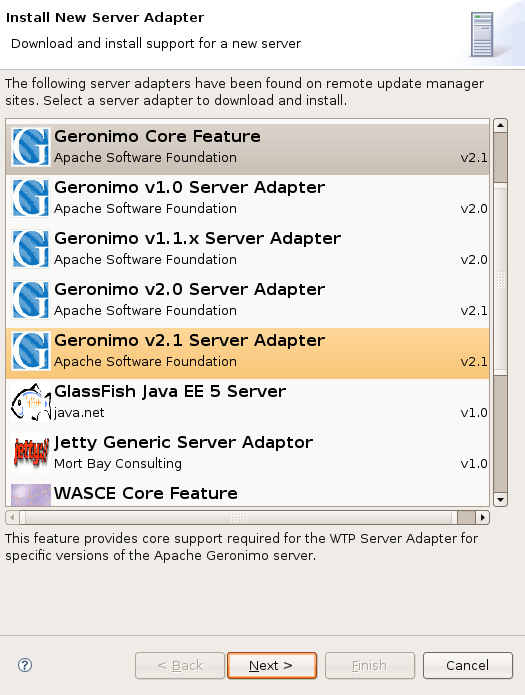


Additional server runtimes available for Eclipse

When creating a server, you can opt to download additional runtimes such as GlassFish, Geronimo, WebSphere, etc. I see different versions of Geronimo, but I also see a "core package". I am a bit confused here as to what I am supposed to do. I guess I need both the core package and one of the server versions, so I select both the core package and version 2.1. After specifying a target directory, it downloads the stuff and installs it, or so I thought. Much to my surprise, Geronimo could not be selected as a server yet. It seemed that only the core packages were installed. I had to go through the additional runtime download again, this time only selecting the server. I was now able to add the Geronimo server and decided to add my test web project to it as well while it is prompting me for it. So far so good.
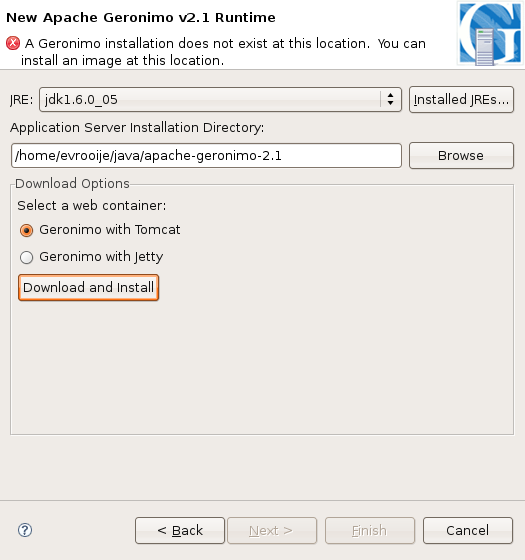


Download and install of Geronimo from within Eclipse

At this stage I want to start the server, but things go wrong from here. It just says that "the server failed to start". There are no additional details in the error log whatsoever. I tried to start Geronimo using bin/gsh geronimo/start-server from within the directory I had selected in Eclipse. This crashes due to some missing dependency. So maybe I did something wrong? Well, after this, I downloaded the minimal Tomcat/ Geronimo 2.1.1, unpacked it and started it without any problem whatsoever using bin/gsh geronimo/start-server. It happily reports "Geronimo Application Server started", so it is most certainly not something I am doing wrong.

Maybe if the download from within Eclipse is somehow incorrect, I can try using that Geronimo I had downloaded myself? Unfortunately no. Creating a server that uses the manually downloaded Geronimo fails, and again it just says that "the server failed to start". No log entries whatsoever. I finally tried to install the plugins manually from Apache's update sites. This informs me that there are all kinds of problems with the dependencies, and I get a feel that this could very well be related with the failure of the server to start. So much for my enthusiastic start with WTP.
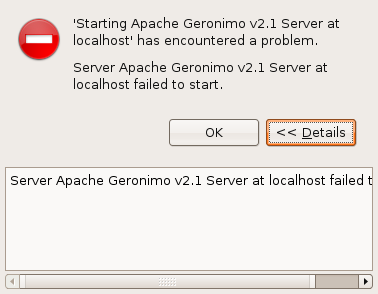


Geronimo server failed to start

One problem is that the end user is given the expectation that it can download, install and run additional runtimes automagically. The additional runtimes dialog presents us with a list of available runtimes decorated with their logos. It gives the impression that this is "something that Eclipse can do". The expectation however is far from the reality, and the real issue is obviously with the third party plugins that are downloaded and not so much with WTP.

Conclusion

Some of the server runtime plugins supplied by third parties have problems with (this version of) Eclipse. I was never able to get them to work well or work at all with Europa, and they exhibit problems with this newer Ganymede release as well. So what good is a simultaneous release of the JEE bundle if there is no good support from the third party application servers such as e.g. Geronimo? Why provide fancy options to install stuff that just leads to disaster? What about the willingness and/ or ability of the third party vendor/ community to put effort in getting these plugins to work (in time for the release)? Getting the plugin providers to be part of the simultaneous release is very likely to be a bridge too far.


Trying to get Geronimo to work eventually broke my update manager to the point I had to reinstall Eclipse (clean start didn't help...)

JBoss does not work well either, but this post is getting too long, so I'll go into more details on that in the next one. I've still got many other thoughts on this as well and I intend to add them in a "grand conclusion" of my reviews of Ganymede RC2.


Tuesday, June 10, 2008

Eclipse Ganymede RC2 Data Tools

This post is one of a number of reviews of the upcoming Eclipse Ganymede release. It has been added to the Ganymede Around the World map. Donate and become a Friend of Eclipse!

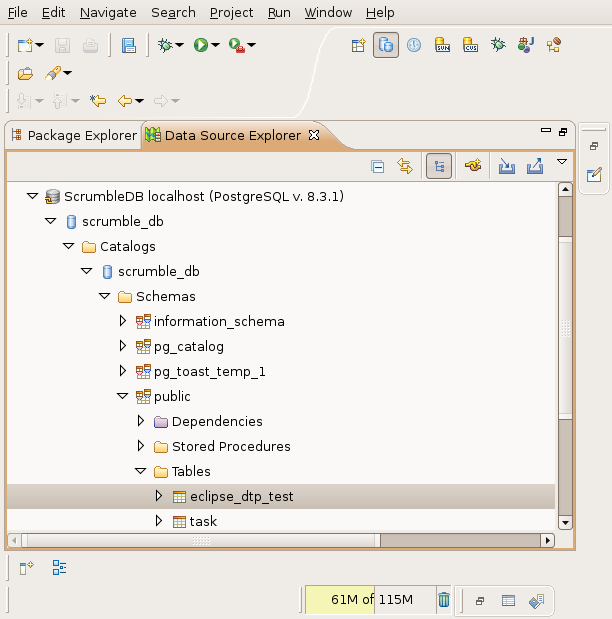
More Eclipse Ganymede RC2 stuff reviewed, more stuff to blog about, and once again something I really appreciate! I was giving a Java basics course and got to the point of explaining JDBC, iBatis and PostgreSQL. For this course, I could not get the data tools to work with my postgres (8.3.1) database install. Adding the connection and pinging the database worked, but trying to navigate the database in the data source explorer failed miserably. This might have been an issue specific to (this version of) PostgreSQL, but to me it was yet another one of those things that didn't work with Europa. It forced me to switch between Eclipse and psql/ pgAdmin to run the scripts I had created in Eclipse, copying and pasting as I went along.

With Ganymede I have not only been able to add and ping my postgres 8.3.1 databases, I was able to browse them as well! It just works (TM), out of the box (R)! Now I can also set the connection info on my SQL scripts and execute them from within Eclipse: Just right click a .sql file and select "Execute SQL Files". Excellent!! One minor remark is that I would have expected to be able to run the SQL queries from the "Run" toolbar button (the first place I went looking). I'll check and see if a bugzilla exists, and if not, I'll register it as an enhancement and see if this is something worth adding in the future.


Browsing the PostgreSQL database structure

The SQL execution engine does not understand the psql specific \i syntax for including external files, but that's understandable as these queries are fired to the database via JDBC and not via psql. The \i is something psql knows about, the server does not, nor does DTP. As I use \i for my scripts to run in the correct order, I will have to find a way around this or try something completely different. For this one I will also check and see if an "include file" (not necessarily using a \i syntax) bugzilla exists. Again, if not, I'll create one and check if people care about such a thing.


SQL editor connected to a database


Conclusion

Besides these minor usability issues, I am again pleasantly surprised by something that is working rather than not. Like I said in my previous post, I have great hopes that this release will be in many ways more mature than the Europa bundle. I am starting to become more and more enthusiastic the more I use Ganymede! Another case deserving two thumbs up!

Some other things I've already been fiddling around with are the web tools, getting Tomcat to work and run a simple web application. So for my next post I'll have a closer look into WTP and see if this time I will be more successful installing, running and deploying to "Geronimoooooo!!!!!" ;-)


Monday, June 09, 2008

Friend of Eclipse

After all these years of using Eclipse and Eclipse based technology, I decided to do something for the Eclipse foundation and community. There is a friends of Eclipse program where you can donate $35 or more and become a friend. You get access to a friends of Eclipse mirror site and as an individual you are allowed to carry the friends' logo, which is what I'm gonna do on this blog ;-)


Become a friend of Eclipse as well! You'll help out the foundation and community around this great project. Donations can be made here:

http://www.eclipse.org/donate/index.php

Eclipse Ganymede RC2 First Impression

This post is one of a number of reviews of the upcoming Eclipse Ganymede release. It has been added to the Ganymede Around the World map. Donate and become a Friend of Eclipse!

Update regarding Subclipse and Ganymede (June 29th): It seems that a lot of traffic is landing on this page via Google regarding this topic. If you landed here because you are having trouble getting Subclipse to work, you may want to check this article.

The good folks over at Eclipse want reviews of the Ganymede release candidate. Now that's an excellent motivation to download and start using this new version of Eclipse. So without further ado, here's a hands on review of the new Ganymede RC2 build.

After downloading and unpacking the JEE bundle, I started Eclipse with my old workspace to see how the workspace migration would fare. All my Java projects are there, so that's a good sign. It could not fully restore the workbench layout though due to missing plugins that I did not install yet. My bad, time to install the missing Subversion plugin first. The other missing plugin, a LDAP browser, can wait. Setting the proxy now supports the use of the system proxy, a very welcome feature!

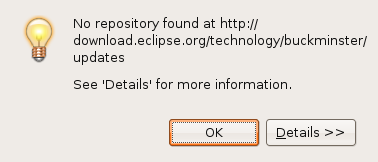
The software update and plugin install system has changed. This new system looks good. It is easy to use and get used to. Just go to "Available Software" and "Add Site...". The site configuration only allows for a URL, no longer a name. Entering http://subclipse.tigris.org/update_1.2.x adds the Subclipse update site. I now get an error about Buckminster, it looks like the Buckminster integration repository is gone.


Buckminster error

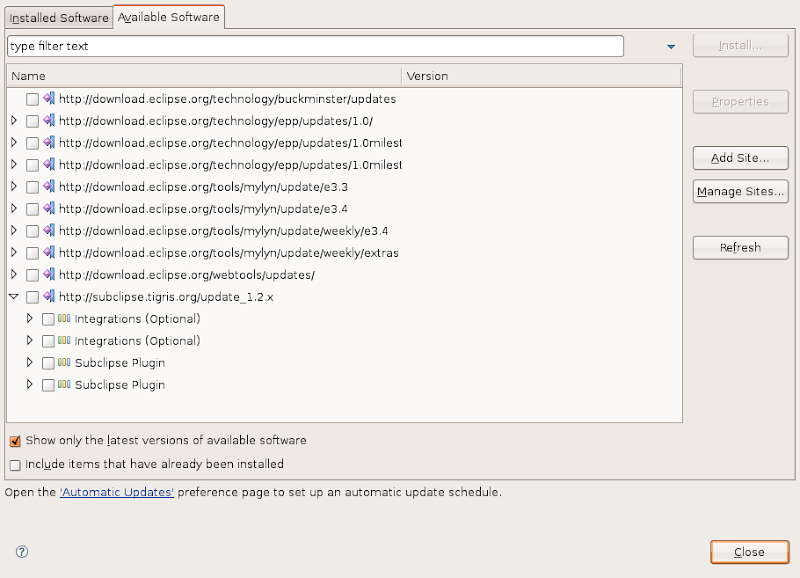
I also get to see the "Integrations (Optional)" and "Subclipse Plugin" twice. Removing the SVN site and adding it again solves the latter problem. The buckminster error disappeared as well. Checking Subclipse and Mylyn integration, and install!


Strange behavior after the Buckminster error, features are shown twice

Getting the plugin to work without restart causes some problems. I still have the old perspective button, and it is not functioning properly. After a restart, the perspective works (guess I am pushing my luck applying changes on the fly). Getting rid of the LDAP browser perspective button reveals some quirks as well. The "Close" menu on the perspective's button does not work, but I am able switch to it and then close it via the "Window" menu. Weird, but nothing too spectacular.

Checking my Mylyn tasks, I see that I am missing the Trac task repository that I had configured. This is probably due to the fact that the Trac connector is not there yet, so let's install that as well. This is where it gets a bit confusing. The installed software says I have Mylyn 3.0.0, but in the available software I only see version 2.3.2 for Eclipse 3.4. I wouldn't want to downgrade, so let's add the weekly Eclipse 3.4 update site then and see what happens.

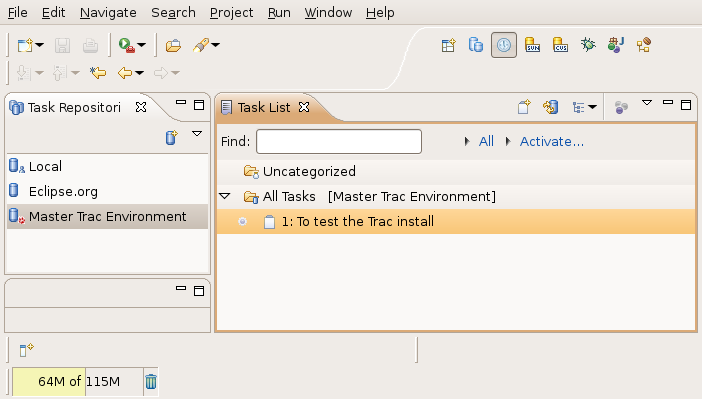
After adding http://download.eclipse.org/tools/mylyn/update/weekly/e3.4 and selecting the Mylyn stuff I need, I get the message that my original request was modified, saying things like: "Feature X is already installed, so an update will be performed instead." Great! It will update my existing install with the Mylyn weekly updates! After installation the Trac repository from my old workspace automagically appears, together with the queries I had defined.


Mylyn back in business, old repositories and queries are restored

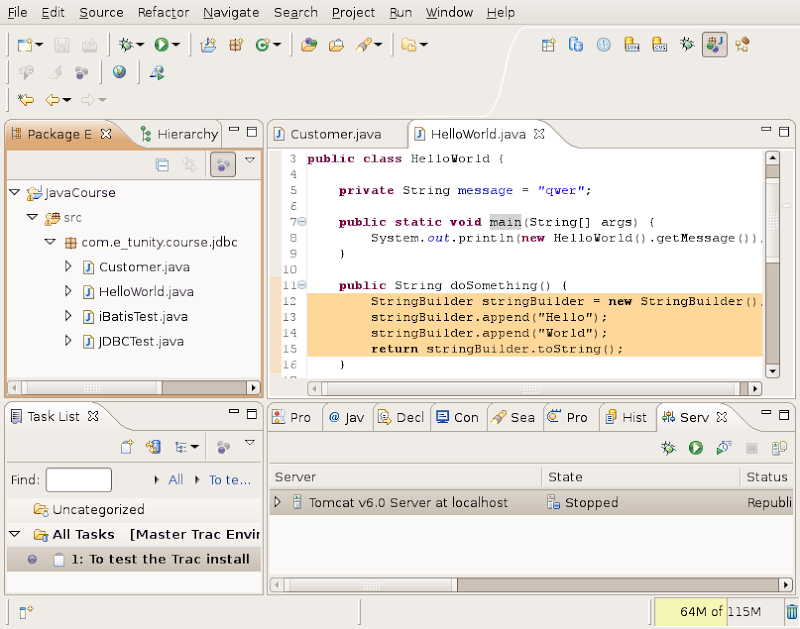
Java coding adds a range of small but very handy great time saving features, such as the string concatenation to string buffer conversion quick fix, automatic casts in the code completion, a quick fix for getter and setter generation, etc. The breadcrumb feature gives a means to browse source code with full screen editors, so no need to unmaximize to get to the package explorer, and then maximizing again. I can also imagine that this will work well for those who have smaller displays.


Showing off Mylyn active task focus and the String to StringBuffer conversion


Conclusion

This is just a first impression of Ganymede RC2 and I have just converted my old workspace, performed some basic tasks and tested some of the new features. I did run into some quirks here and there, but my overall impression so far is quite good. I was afraid that featurism combined with the daunting task of delivering this combined release would result in below par quality, but I am proven wrong so far. I have not (yet) run into major show stoppers. So there's hope that this release will be a step forward as far as the maturity of the various bundled components is concerned. There are no major changes in the appearance, and that is just fine with me. Java coding works pretty much the same, so I can pick up where I left in my old workspace. Add the time savers to that, and I am a happy coder.

So where is all this going? I have only touched a very small part of what is becoming a huge beast. Eclipse has come a long way ever since I started using version 2. At first it was yet another IDE, now it is a full fledged enterprise application development environment (if you wish, that is!). I have been very, very impressed with Mylyn. I have been using it since the very first release and it's great that it allows you to focus on the task and its associated resources at hand. Being part of an open platform itself, Mylyn integrates with other open platforms such as Trac. I am trying to setup Trac for task tracking and project management. The Trac connector brings all this task management straight into the development environment itself. So besides this beast becoming more technology and enterprisey, it also has the potential of becoming a true collaborative development platform that is connected via the web.

Eclipse has always been my favorite IDE ever since version 2, and by the looks of Ganymede it'll be my favorite IDE for many more years to come. Two thumbs up and let's hope this simultaneous release is going to be a huge success!


Thursday, May 22, 2008

Double Sided Boarding Passes Work

W00t! My double sided boarding pass mistake worked wonders today. In the morning it was folded to show the flight to London. When I arrived there I folded it so it would open on the way back to Amsterdam.


Scanning the bar code was no problem, as they didn't overlap and cause issues with the bar code on the other side shining thru. Nobody complained (not sure whether they evar noticed, have a policy that allows this or have already seen other passengers doing this too).


Next challenge would be to print both on one side and see if the let me board, just because we can, although I think they may have a problem with that (passes are shrunk, more difficult to read, bar code may not scan, it's just plain weird to do something like that, etc.).


As promised two (blurry for authenticity's sake ;-) pictures of the double sided boarding pass (notice "BOARDING PASS" in mirror shining through in the second one):


Wednesday, May 21, 2008

Double Sided Boarding Pass

Nowadays aircraft carriers allow you to print your own boarding passes. Tomorrow I have to fly someplace and back the same day. I checked in on the carriers website and opened the PDF document with the two boarding passes, page one to and page two back.


I hardly ever print. When I do, I print double sided. Saves a bunch of trees. I forgot to turn that off printing the boarding passes tho, so I ended up with both to and back on the same piece of paper. To on the one side, back on the other. A double sided boarding pass so to say ;-)


Now that made me wonder: will they allow me to use that single piece of paper with the two boarding passes, one on each side? Why not give it a try. The bar codes on each side don't overlap, so that should not be a problem when scanning! I'll just have to make sure that I show the right side for the right flight!


I'll let you know if it worked out or not! And post some pictures of the double sided boarding pass as well! If it works, I'll be doing this more often. Heck!! I'm even gonna try to print both passes on a single side and see if I can get away with that!!


"Why?", you might ask: just because I can ;-)


Saturday, May 03, 2008

Open Source SWIFT Parser in Java

I have more than once in the past tried to find an open source SWIFT message parser. There are some defunct/ idle projects (one MT94X parser, jSWIFT, SWIFT Message Parser in Java) and some import/ export components that are part of larger projects (e.g. gnucash). I have now stumbled upon a proper stand alone and open source (LGPL) SWIFT message parser called WIFE.

WIFE is written in Java and sports parsing all message categories and service messages into a message model (message, blocks, tags). This model can be written to a SWIFT message. WIFE also supports converting to and from a (albeit non-standard) XML format and persisting messages using Hibernate. Interesting find! Might come in handy for some projects.

Monday, November 26, 2007

Deploying Web Applications Outside the Tomcat Install Directory

Suppose you have Tomcat installed somewhere, e.g. /opt/tomcat6 or /usr/local/tomcat5. Now you want to give users the ability to deploy their applications and start/ stop the Tomcat server if needed (e.g. in case of an unrecoverable crash of the Tomcat server). You can start modifying the Tomcat install directory to support multiple users (e.g. in a given group) to write in the webapps directory and to be able to deploy context files under conf and maybe add dummy users to the tomcat-users.xml to test authentication. But that is breaking open the main Tomcat install directory and potentially allowing users to break things. Another drawback is that having a single instance will cause all applications running on this instance to be unavailable if the server is shut down.

I will describe an alternative way of supporting multiple users using the Tomcat install, by means of each user/ application having its own server. The drawback of this approach is that multiple port numbers are needed and this requires a bit of coordination between users. The advantages however are that not a single change is needed in the Tomcat installation directory whatsoever, users can start stop their own instances without impacting other users/ applications and .

First you'll need a strategy of where to put the user's or application's Tomcat stuff. You could use /app or /opt, e.g. /app/user1, /app/user2, /opt/application1, etc. /app might be a better choice as some software installs in /opt and this could potentially cause the user's/ application's Tomcat stuff to be mixed with other software that you may or want to have installed in /opt. In this example we will have Tomcat 6 installed in /usr/local/tomcat6 and use /app for the applications. We will have two applications, acmeweb (Acme corporation's E-Business website) and acmehr (Acme corporation's human resources application). Create users acmeweb and acmehr with groups acmeweb and acmehr respectively and set their passwords:

adduser --system --shell /bin/bash --group acmeweb
adduser --system --shell /bin/bash --group acmehr
passwd acmeweb
passwd acmehr


Underneath /app create the acmeweb directory. Underneath acmeweb, create the directories bin, conf, webapps, temp, work and logs:

mkdir -p /app/acmeweb
cd /app/acmeweb
mkdir bin conf webapps temp work logs


Copy the following Tomcat scripts to bin:

cd /usr/local/tomcat6/bin/
cp startup.sh shutdown.sh setclasspath.sh catalina.sh /app/acmeweb/bin


Copy the following Tomcat configuration files to conf:

cd ../conf
cp server.xml web.xml /app/acmeweb/conf


Recursively copy /app/acmeweb to /app/acmehr:

cd /app
cp -R acmeweb acmehr


Recursively change ownership of the directories to the proper user and group:

chown -R acmeweb.acmeweb acmeweb
chown -R acmehr.acmehr acmehr


Set the user to acmeweb and create a .profile:

su - acmeweb
vi .profile


Put the following contents in the .profile:

export JAVA_HOME=/usr/local/java6
export CATALINA_HOME=/usr/local/tomcat6
export CATALINA_BASE=/app/acmeweb


Logout and set user to acmeweb again. Edit /app/acmeweb/conf/server.xml:

ctrl-d
su - acmeweb
vi /app/acmeweb/conf/server.xml


Modify the server, AJP and HTTP connector ports and change them to 20105, 20109 and 20180 respectively (you may also consider turning off the AJP connector altogether):

<Server port="20105" shutdown="SHUTDOWN">
...
<Connector port="20180" protocol="HTTP/1.1"
           connectionTimeout="20000"
           redirectPort="8443" />
...
<Connector port="20109" protocol="AJP/1.3" redirectPort="8443" />


Create a ROOT context, add an index.html to the context and start Tomcat:

cd /app/acmeweb
mkdir webapps/ROOT
echo Acme Web > webapps/ROOT/index.html
bin/startup.sh


Logout as the acmeweb user, set the user to acmehr and create a .profile:

ctrl-d
su - acmehr
vi .profile


Put the following contents in the .profile:

export JAVA_HOME=/usr/local/java6
export CATALINA_HOME=/usr/local/tomcat6
export CATALINA_BASE=/app/acmehr


Logout and set user to acmehr again. Edit /app/acmehr/conf/server.xml:

ctrl-d
su - acmehr
vi /app/acmehr/conf/server.xml


Modify the server, AJP and HTTP connector ports and change them to 20205, 20209 and 20280 respectively (you may also consider turning off the AJP connector altogether):

<Server port="20205" shutdown="SHUTDOWN">
...
<Connector port="20280" protocol="HTTP/1.1"
           connectionTimeout="20000"
           redirectPort="8443" />
...
<Connector port="20209" protocol="AJP/1.3" redirectPort="8443" />


Create a ROOT context, add an index.html to the context and start Tomcat:

cd /app/acmehr
mkdir webapps/ROOT
echo Acme HR > webapps/ROOT/index.html
bin/startup.sh


Open a browser and connect to the IP address of your Tomcat server, ports 20180 and 20280:

http://<tomcat server ip address>:20180/
http://<tomcat server ip address>:20280/


The first should display Acme Web in your browser, the second Acme HR. Both instances are running under their own user, these users can restart their own instance of Tomcat and the configuration of the server can be done by those users:

acmeweb 5295 1 0 23:02 ? 00:00:04 /usr/local/java6/bin/java -Djava.endorsed.dirs=/usr/local/tomcat6/endorsed -classpath :/usr/local/tomcat6/bin/bootstrap.jar:/usr/local/tomcat6/bin/commons-logging-api.jar -Dcatalina.base=/app/acmeweb -Dcatalina.home=/usr/local/tomcat6 -Djava.io.tmpdir=/app/acmeweb/temp org.apache.catalina.startup.Bootstrap start

acmehr 5333 1 0 23:05 ? 00:00:03 /usr/local/java6/bin/java -Djava.endorsed.dirs=/usr/local/tomcat6/endorsed -classpath :/usr/local/tomcat6/bin/bootstrap.jar:/usr/local/tomcat6/bin/commons-logging-api.jar -Dcatalina.base=/app/acmehr -Dcatalina.home=/usr/local/tomcat6 -Djava.io.tmpdir=/app/acmehr/temp org.apache.catalina.startup.Bootstrap start


In this setup the main Tomcat install directory in /usr/local/tomcat6 remains untouched. The trick is setting the CATALINA_HOME to the tomcat install in /usr/local/tomcat6 and CATALINA_BASE to the user specific Tomcat directory in /app/acmeweb and /app/acmehr.