Friday, September 12, 2008

A grisly situation on Grizzly peak

Tuesday I did my last scramble in the Canadian Rockies and climbed Grizzly peak, an easy little 2500 meter high peak (just a 900 meter elevation gain according to Kane) to finish of the scrambling season and my stay in the mountains. With such an easy little peak and with the weather starting out to be quite nice, what could possibly go wrong! Sure enough the climb to the summit of Grizzly peak was an easy one. At one of the cliff bands below I had to use my hands once or twice, but the most part was a steep hike and the final bit to the summit was just an easy stroll. Time to wander around the summit ridge a bit, take some pictures and have a snack.


On the summit of Grizzly peak

As I was on the summit, I noticed a cloud spilling over the top of Opal ridge to the north (the "peak" behind me in the above picture). It moved southward and directly towards me. Oh well, at that elevation it would most likely be snow or hail, and that beats rain as you don't get as wet. I figured so much because when I did the final stroll to the summit, I could see the odd little hailstone fall down.


Clouds rolling over the mountain to the north

As the cloud moved closer, the wind really picked up and it cooled down a lot. It was time to put on a sweater and finish my summit smoke. I made one final picture of the descend route with small clouds starting to roll over the col between Evan-Thomas and Grizzly peak before putting on my gloves and heading down again.


The col between Grizzly peak and mount Evan-Thomas

As I was putting on my right hand glove, all of a sudden, out of the blue, I hear thunder!! It was not just some hail or snow, it was a friggin thunderstorm that was heading towards me!! And I am on the gawd damn summit of a gawd damn mountain!! Boy, was I panic-stricken at that point. I cursed out loud and packed all my stuff as fast as I can. I frantically put on the other glove and my backpack.

And then I just started to run down the mountain. And I mean, I just ran! I ran down the summit's grassy slopes towards the col. To the right of the col there's a wide gully filled with scree. I jumped into the gully and slid down on the scree. I never scree skied as fast as I did then. As I slid down the gully, the hail started to come down big time, and I mean like shitloads. They weren't the large golf ball sized stones tho, thank god for that!

I looked around to see if there was any place I could use as shelter. The only place I could see was a large crack below a large vertical cliff, which however required climbing up again. I decided to keep on running down and traversed a rib on my right to get into the next gully. Again, I literally jumped into the gully and scree skied down as fast as I could.

What had taken me more than 1 1/2 hour to ascend, only took me about 15 minutes to descend sliding down those gullies! I finally ran down a grassy rib and got into the valley down below where I felt it would be safe. At that time the thunderstorm moved in on the peak and the flashes of lightning and rumble of thunder could be seen and heard nearby.

And just to make a bad day even worse: while descending the valley to the roadside, the hail turned into rain and the trail turned into mud. By the time I got to the side of the road, I was completely soaked. So much for a nice, easy and laid back ascend of Grizzly peak, bah! This just shows you how unpredictable mountain weather can be!
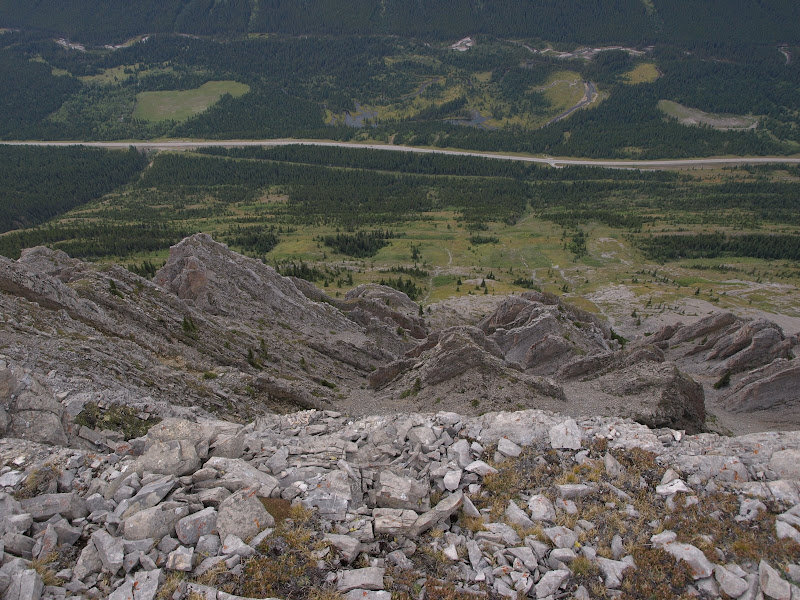


A view over the edge of the summit down to highway 40 (Kananaskis trail) some 900 meter below

Friday, August 15, 2008

Got me an Eclipse jacket!!

I got a mail from Lynn from the Eclipse foundation on Tuesday, congratulating me with being among the best three reviews!! That gave me a big smile that entire day (in an otherwise shitty week), boasting to my colleagues I'd be wearing an Eclipse shirt (yep, got that one too) and jacket pretty soon! Besides being proud, glad that my efforts paid off and very happy to get the shirt and jacket, I also hope my reviews have contributed to Eclipse in some way or another!

I want to congratulate the Eclipse foundation and community for giving me the environment I've happily been working in for many years now!!

Friday, July 18, 2008

OpenLDAP multiple database support under Ubuntu

My OpenLDAP slapd was working just fine, until I tried to run multiple databases. I had created multiple new directories under /var/lib/ldap and moved the original contents of /var/lib/ldap to one of these new subdirectories. In this setup, when starting slapd, it would fail and I would get the following error in the syslog:


[10871.644142] audit(1216392346.825:24): type=1503 operation="inode_create" requested_mask="w::" denied_mask="w::"
name="/var/lib/ldap/database1/DUMMY" pid=16406 profile="/usr/sbin/slapd" namespace="default"
/etc/ldap/slapd.conf: line 64: invalid path: Permission denied

The audit entry is an audit from AppArmor. It seems that in Ubuntu AppArmor is configured for slapd, and in such a way that it cannot support multiple databases. In the /etc/apparmor.d/usr.sbin.slapd file it says:


# the databases and logs
/var/lib/ldap/ r,
/var/lib/ldap/* rw,

The single * means everything except when it contains a / (excluding subdirectories). So in order to support multiple LDAP databases, one needs to rewrite the /var/lib/ldap/* rw entry as:


/var/lib/ldap/** rwk,

This will grant read/ write access to slapd on this directory and all subdirectories thereof. Another thing that I had to do is appending the k to rw, in order for slapd to be allowed to lock files as well (I got audit messages complaining about operation="file_lock"). After a restart of AppArmor, e.g. "/etc/init.d/apparmor restart", it is now possible to start slapd again and have multiple databases, e.g. /var/lib/ldap/database1, /var/lib/ldap/database2, etc.


Sunday, July 13, 2008

Eclipse Ganymede ECF review

This post is one of a number of reviews of the Eclipse Ganymede release. It has been added to the Ganymede Around the World map. Donate and become a Friend of Eclipse!

One of the projects that is part of the Ganymede simultaneous release is the Eclipse Communication Framework (ECF). I had never done anything with it before, so writing a review is a great chance to actually do something with it. The update site for getting is ECF is:

http://download.eclipse.org/technology/ecf/2.0/3.4/updateSite/site.xml


One of the things you will get is a communication perspective. In this perspective, you have the following two buttons, the first one for connecting to an IM provider, the second one for connecting to a collaboration server. In this review I will focus on the XMPP connectivity available under the "Connect to Provider" button. XMPP is the protocol used by Jabber and GTalk, and I happen to have two GTalk users (one is for XMPP testing purposes for some components I made using the Smack API).


The "Connect to Provider" and "Connect Workspace to Collaboration Group" buttons

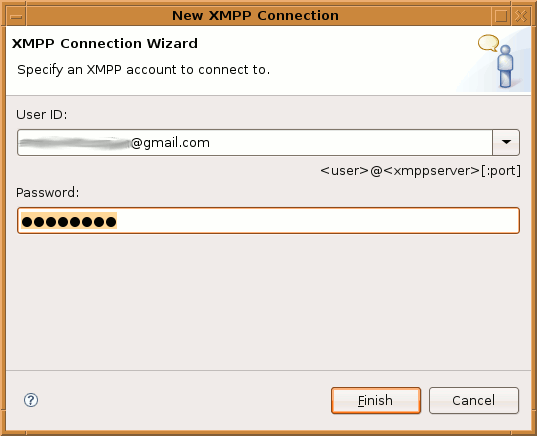
To connect to e.g. GTalk or another Jabber server, select the XMPP provider. This requires you to enter your user name, the XMPP server and the port number where the XMPP server resides. In the case of GTalk you will only have to enter username@gmail.com. It will then connect to the default port 5222 and authenticate with the given user name.


The "New XMPP Connection" dialog where you can enter the XMPP connection string

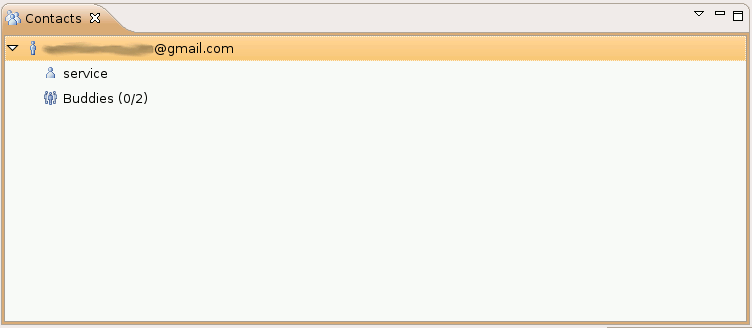
Once connected, you will see the the contacts view appear with the list of your GTalk buddies. Double click a buddy and you can happily start chatting from within Eclipse. One of the drawbacks that I see here is the fact that you must be in the communication perspective (or add the communication buttons to your Java perspective). The communication views themselves do not provide buttons for connecting and are just a gray area with some explanatory text. This is something that could be done better I think. I would expect a list of accounts and the ability to add accounts via a context menu in a view, much like the server view of the JEE tooling.


GTalk buddies in the contacts view

There is also no way of automatically connecting (see bug 181510), requiring me to continuously go through these steps in order to connect. Furthermore, the XMPP connect dialog only allows user@host for both the user name (used for authentication) and the server name. I can foresee problems here, as with Jabber/ XMPP the domain used for authentication is not necessarily the server name you connect to.

You can collaborate with your Jabber/ GTalk buddies via XMPP. You can send URL's, screen captures, files, etc. from within the contacts view by right clicking a buddy. Sending URL's via XMPP requires the receiver's permission before it is opened, which is a good thing in case a malicious user were to send out links to malicious websites. When using the ECF collaboration server, there are no such controls in place, causing the web site to immediately appear in the receiving Eclipse.

To share an editor via XMPP, right click in the editor, select "Share Editor With" and navigate to a buddy. The receiver is now asked permission and upon acceptance the shared editor is opened. Changes in one editor are propagated to the other. The following screen cast shows the simultaneous update of the two editors in action (or click here if it does not display):


Click the play button to see a screen cast of the two shared editors being updated in sync


Conclusion

ECF looks promising when using the XMPP provider. It allows you to use your existing IM accounts in Eclipse and provides collaboration features such as shared editors. This comes in handy for distributed teams or in case you deal with home workers (like I do). The ability to connect to your existing buddies and get all these collaboration features inside the IDE is nice.

Now for the bad: The way things are presented is IMO not the best and could use quite a bit of rework. It is usable, just not very user friendly yet. The way XMPP user names and server names are entered might cause problems for some Jabber installs, e.g. in case you have "username@some.group" as user ID and the server name is "myjabberserver.com". ECF uses the Smack API for XMPP connectivity, and that API does not support HTTP proxies yet (a request that is outstanding for quite some time now). This will require you to do some tunneling in case you are behind a firewall. Receiving screen captures does not require permission from the receiver.

Some of these issues are minor, some are not. There is a lot of room for improvement. The project has sparked my interest though, and I will follow its progress and hope to see those improvements in future releases.

Tuesday, July 08, 2008

Tunneling Eclipse Communication Framework and GTalk with proxytunnel

This article explains how you can use the GTalk connectivity of the Eclipse Communication Framework (ECF) via a HTTP tunnel (e.g. proxytunnel). This might come in handy in case you are behind a proxy that does not allow connections to talk.google.com, port 5222. Furthermore, ECF uses the Smack API, which does not support the use of a network proxy (yet). The article is targeted at a Unix audience.

Let us assume that our remote host to which we will connect using ssh on port 443 in order to setup the tunnel is called tunneltarget (e.g. IP address 1.2.3.4) and that the network proxy is called yourproxy and runs on port 80. Now our ~/.ssh/config would look like this:

host tunneltarget
ProtocolKeepAlives 30
ProxyCommand /location/of/proxytunnel -p yourproxy:80 -d 1.2.3.4:443
LocalForward 5222 talk.google.com:5222

Obviously you will have to replace tunneltarget with whatever alias you would like, /location/of with the true location where you have installed proxytunnel and yourproxy:80 with the true hostname/ IP address and port number of you HTTP proxy. The LocalForward directive opens a socket on localhost that listens on port 5222 and forwards to talk.google.com, port 5222, via the tunneltarget (your ssh server). You can now start the tunnel (where userid is your user on your ssh server):

ssh userid@tunneltarget

Unfortunately this is not enough to be able to sign in to GTalk with ECF. ECF requires you to enter your GMail ID (e.g. youruser@gmail.com) and I think it uses this single string for both authentication and the GTalk server's hostname to connect to. This means that if you enter youruser@gmail.com, you will not be able to connect, and if you use youruser@localhost, you will not be able to sign in to GTalk. I could not get any combination (@localhost, @gmail.com, @talk.google.com) to work.

The only way I got it to work was by pointing talk.google.com to 127.0.0.1 in /etc/hosts. One could setup a "Location" (as it is called in Ubuntu) with specific network settings such as specific hosts file contents for that location. Once talk.google.com is rerouted to localhost, you can use the following connect string to connect ECF with GTalk:

youruser@gmail.com

This is a bit of a kludge, so lets hope the Smack API will have proxy support very soon.


Tuesday, July 01, 2008

IMSLP has opened again!!

The International Music Score Library Project (IMSLP) has reopened! The IMSLP is a huge database of musical scores that have become public domain. It currently holds more than 16000 musical scores. Although some of the scores are a bit dated, the IMSLP is a great resource to find that music score of that famous composer you always wanted to play. But there are numerous lesser known composers in the library as well, which makes the IMSLP a great place to discover hidden treasures in music.

Just to give a simple example of the vastness of the library, have a look at the Beethoven page! Or the Mozart page! Now that'll keep you busy for a while... This is a highly recommended resource for any musician or student!


Sunday, June 29, 2008

Eclipse 3.4 Ganymede and Subclipse 1.4

Well, quite some traffic is coming into my site from Google regarding Eclipse 3.4/ Ganymede and Subclipse. These people land on my Ganymede first impression article, but are more likely running into problems with the new version of Subclipse. For those people, I hope this page can provide you with a little guidance on how to get Subclipse to work with Ganymede. Bear with me, as the version numbers 1.4.x and 1.5.x of Subversion and Subclipse can become very confusing!

As of June 19th 2008, a new 1.4.x version of the Subclipse plugin has been published as the update site to use on the Subclipse web site. The link to the update site of the old version 1.2.x Subclipse plugin has disappeared. Now, for this new 1.4.x Subclipse plugin, the Subversion 1.5.0 client libraries and bindings are required!

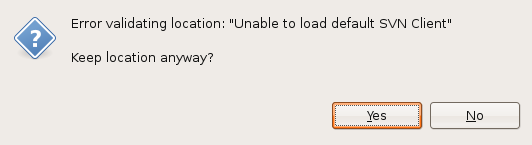
I for one run Ubuntu 8.04 Hardy Heron, and that ships with Subversion 1.4.6. This means that if I were to install the new 1.4.x Subclipse plugin and opt to install the JavaHL adapter only (because that is the recommended adapter), it will not work:


The "Unable to load default SVN Client" message when running the 1.4.x Subclipse plugin with the JavaHL adapter only

There are various ways around this problem. The first option is to manually install the Subversion 1.5.x client libraries and add them to you library path. For Windows users, it is a simple matter of installing the new Subversion 1.5 client and making sure JavaHL is on the path. For Unix users, this workaround obviously defeats the purpose of having a distro with package management and requires manual installation of the libraries in the correct locations. So this solution might not be the recommended way to go for all.

The second alternative is to also install the SVNKit adapter. This immediately causes Subclipse to work, there is no need to uninstall the JavaHL adapter. Downside of this of course is that you are using a beta version of the adapter. Hopefully there will be a final version of this adapter and an update to Subclipse 1.4.x to include a stable SVNKit soon.

The third alternative is to stick to the old 1.2.x version of Subclipse. This version will work just fine with Ganymede and integrates with the new Mylyn version that ships with it. I was using this old version of Subclipse before in my reviews and daily work with the Ganymede release candidates, and it seemed to run without any problems whatsoever. The link on the Subclipse web site to version 1.2.x has however disappeared, but it is just a matter of replacing the 4 with a 2 in the update site's URL:


http://subclipse.tigris.org/update_1.2.x


I hope this explains things a bit more and solves any problems you may run into in getting Subclipse to work with Ganymede.

Update regarding Subversive (June 29th): An anonymous commenter pointed out one can use Subversive as well. Although it has little to do with getting Subclipse to work, it is indeed another option one could consider. For us Unix users whose package manager has given us a Subversion version other than 1.4.5, you may want to opt for Subversive's SVNKit connector. If you, like me, want Mylyn integration, you also need a second update site besides the one provided by Polarion. The update sites are:


http://download.eclipse.org/technology/subversive/0.7/update-site/ and
http://www.polarion.org/projects/subversive/download/eclipse/2.0/update-site/


Subversive's goal is to eventually become the standard SVN team provider bundled with Eclipse. Although it is currently an incubator project, expect it to work well as it has been provided for a while now by the Polarion community!


Saturday, June 28, 2008

Eclipse Ganymede w00t DTP review!

This post is one of a number of reviews of the Eclipse Ganymede release. It has been added to the Ganymede Around the World map. Donate and become a Friend of Eclipse!

First an update and apologies for not posting more Ganymede stuff. I've been very, very, very busy lately, which is too bad as I don't get a chance to dive some more into Ganymede. As for the update: I have downloaded the Ganymede release train now, so no more release candidates, no more mister nice guy! This is where the rubber meets the road and the metal meets the meat ;-)

This time I'm posting about something that really rocks! I haven't had a chance to do much with DTP before. I always used external tools such as pgAdmin III, TORa and TOAD or the plain old SQL clients such as psql, sqlplus and gqlplus. I also tend to ask a database developer to do stuff for me instead of doing it myself. That is much safer, considering the fact that any queries I try to produce are amongst the worst the DB guys have seen! I can vividly recall the grimaces on some of their faces when confronted with my queries, full of devilish distincts, sneaky subselects, arduous aggregations and unwieldy unions!

But as I had just posted bugzilla 238890 on the use of the "Run" menu and toolbar for SQL queries, I decided to dig some more into DTP. I had seen some references to a query builder, something I have never seen in Eclipse before. As googling did not yield any immediate results as to how to use this thing or what it looks like, I decided I would take the plunge and try to get this thing to work.

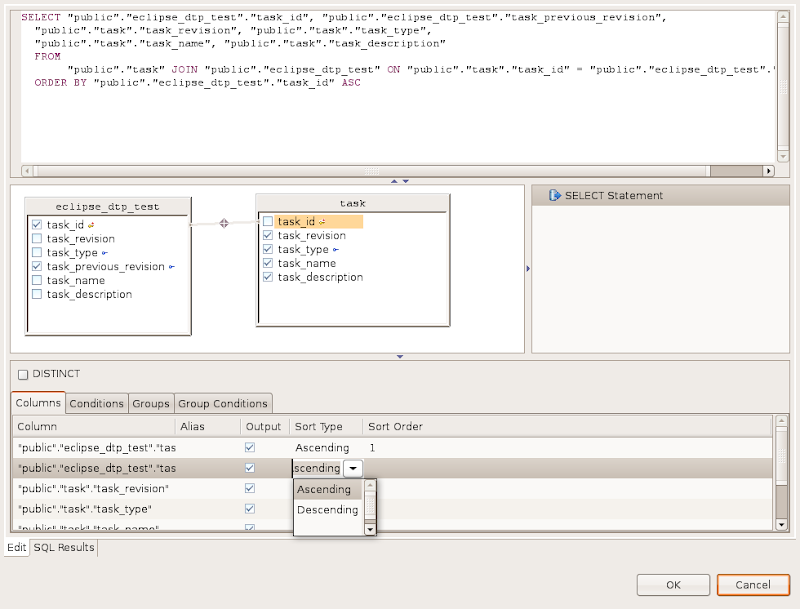
The way to get the visual SQL query builder working in Eclipse is straightforward: create a SQL file and select a database, right click in the SQL editor, select "Edit in SQL Query Builder..." and lo and behold:


Visual SQL query builder in Eclipse Ganymede

This thing works remarkably well! Resizing the tables is a bit quirky, but a graphic display of the selected tables, joining them using drag and drop from FK to PK, selecting the fields, applying order, etc.!? I was astonished! I knew DTP had gotten better, more stable and more mature, but I did not realize that DTP had gotten to the level of visually building SQL queries already!


Conclusion

I really appreciate the things the DTP developers have achieved. I am no longer using external tools such as pgAdmin to do my database work. I can work on most of the things from within Eclipse without having to switch to external programs. I can create my SQL scripts in Eclipse, check them in to version control from within Eclipse and I can run them in Eclipse as well. All of this in one integrated package. This makes me very happy!

Sure, it's not the most polished database tool out there and there is lots more that can be done better. But the matter of the fact is that I can live with quirks if the component works good enough and empowers me to do more stuff in Eclipse itself rather than having to rely on external programs. The more I work with DTP, the more I feel this is the case. And that, my Friends of Eclipse, is a really good thing!